Creating an editable daily schedule for your students can take a lot of hassle out of the school day!
My niece and nephew both started distance learning last week. They’re at my mom’s house all day, and she has been on the struggle bus trying to figure out everything they are supposed to be doing.
My mom likes everything super organized and prepared WAY ahead of time. (I get a double helping of that neurotic behavior from her and my dad : )
It’s been really hard for her to figure out which assignments go with which videos, when things are due, and the exact expectations for each assignment. My niece’s teacher will label a worksheet one thing and then refer to it as something else on a video (which can get confusing).
I am in no way blaming the teacher. This is a difficult time, and everyone is doing their best. With all this in mind, I decided to make a editable daily schedule that might be useful when communicating with parents.
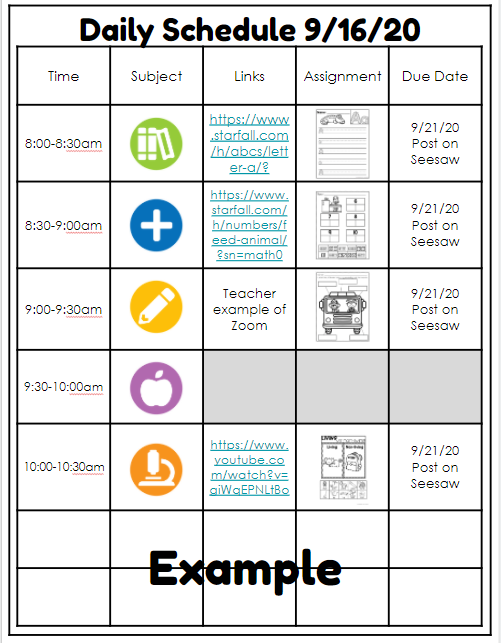
I created this Google Slides editable daily schedule document so you can update it each day and keep everything in one organized place. You can edit the column headings, number of rows, columns, etc.
Form Organization
- Icons – When you click the slide to edit your schedule, you will see a set of icons on the side. You can either cut and paste these or drag and drop them as needed. When you send it out to parents, you’ll want to delete all of your unused icons. The icons just provide a nice visual reminder for students and parents. They also make things look a little more professional.
- Link – Add in any links that students might need for that particular lesson. You can also shorten links using services like bit.ly.
- Assignment – You could easily just write the name of the assignment. To avoid confusion, you can also add a picture. Whether it’s a PowerPoint document or a PDF, you can save almost anything into a JPEG or PNG file.
- Due Date – Get really specific about when the assignment is due, and where it needs to be posted!
The file I am sharing has multiple pages. Here’s a great tutorial on how to only assign a few pages in Google Classroom:
Assigning Pages in Google Classroom
I know making a schedule like this every day seems like more work. I guarantee, though, that if you lay it all out in a clear, concise manner, you will have SO MANY fewer questions from parents and students! It will save you time in the long run.
You can find a free copy of this digital schedule with the link below!
Editable Daily Schedule
If you’d like more distance-learning resources, check out my website!